
How to Cancel Your ReviewForest Subscription
Considering taking a break from ReviewForest? We’re always here to address any concerns, missing features, or issues you might encounter. Our virtual door is open, and we’re ready to assist before you make your decision. No hard feelings, either way.
Here’s a simple and straightforward guide to cancel your subscription:
How to cancel your subscription (standard plan)
Section titled “How to cancel your subscription (standard plan)”-
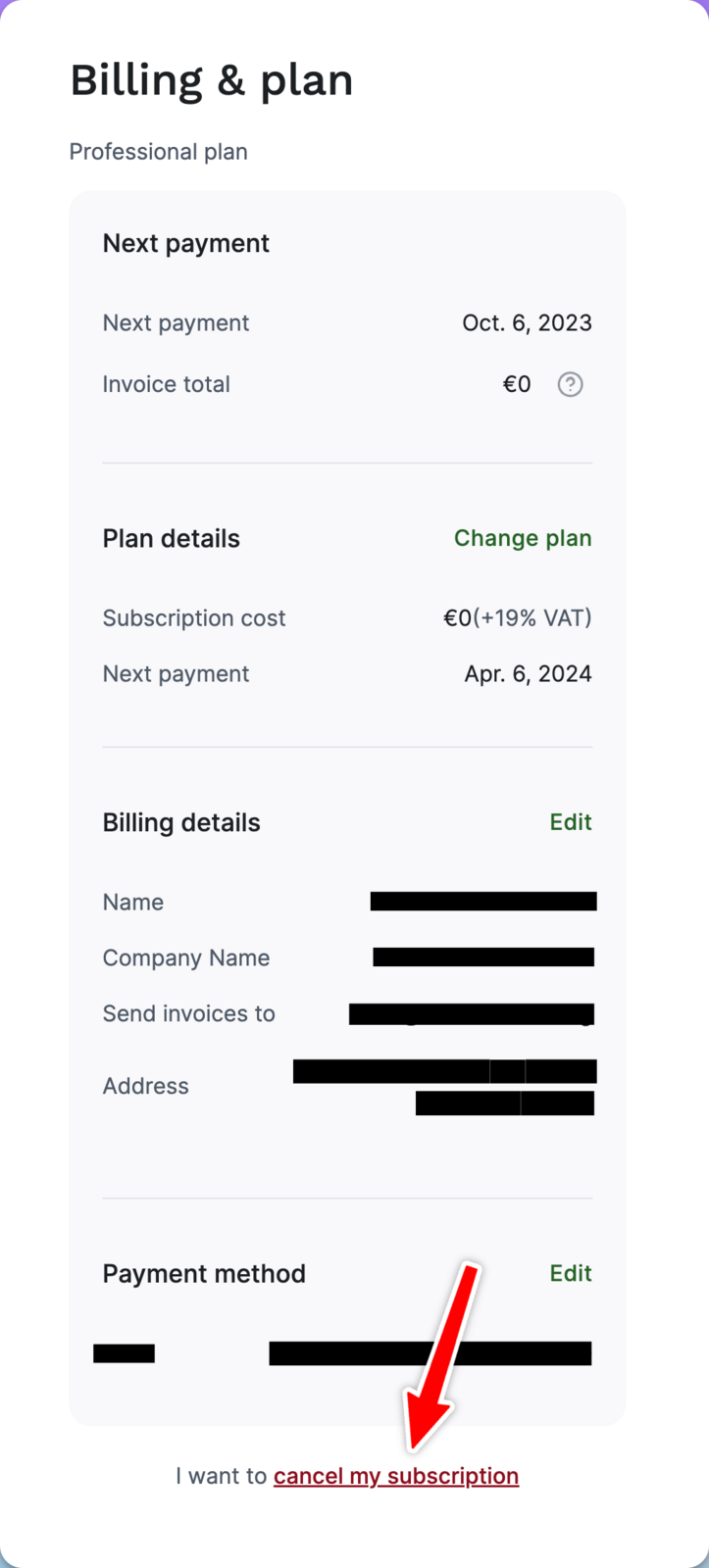
Step into the Clearing: Go to Billing & Plan to access your billing settings.
-
Spot the Exit Sign: At the bottom right, you’ll see a link saying “Cancel my subscription”. Please click on it.
Don’t see this link? You’re most likely on the Grandfather plan. Follow the steps in How to deactivate your review forest (Grandfather plan) instead.
-
Give us Some Feedback: Share your reason for leaving, if possible. Your feedback is invaluable for our growth, though it’s optional.
-
Tread Carefully and Be Informed: Before you cancel, please be aware of the following:
- Your review forest(s) will be deactivated, and customers won’t be able to submit reviews.
- You must stop using the ReviewForest templates, name, or logo for your business.
- Remove any mentions of your business’s association with ReviewForest from social media or blogs.
- Manually remove any ReviewForest widgets and links from your setup.
-
The Final Step: After considering the above, you choose when your cancellation takes effect. You have two options:
- Cancel at the end of the billing period (recommended): Your review forest and all features stay active until that date, with no extra cost for your subscription. We keep planting trees for reviews you receive until then and bill them as usual.
- Cancel immediately: The service stops today, and widgets and features become inactive right away. There is no refund for the current billing period. Trees planted since your last invoice that haven’t been billed yet go straight onto a final invoice.
For trial users, there’s no cost involved.
How to deactivate your review forest (Grandfather plan)
Section titled “How to deactivate your review forest (Grandfather plan)”If your invoices say “Grandfather plan”, you signed up in our earliest days. Back then we charged simply: one review equals one tree, and only the cost of planting that tree was billed. Many features have been added since and we have introduced regular base plans, but your Grandfather plan stayed unchanged.
Cancelling for you is one click: you deactivate your review forest, and your subscription ends together with it. There is no separate “Cancel” link in Billing & Plan for Grandfather customers.
- Go to Review forests and pick the forest you want to deactivate.
- Click “Manage” and then “Deactivate review forest”.
Your forest is now deactivated. If you have multiple forests, repeat the step for each one.
Once all forests are deactivated, your subscription ends in full and no more trees will be planted.
You only get a final invoice if trees were planted since your last monthly invoice. We bill those trees right when you deactivate and charge your saved payment method shortly after. No further invoices follow.
If you also want your data deleted (including the deactivated forests), please contact us via chat or email.