
Why is my review forest inactive?
Your forest page says “This forest is inactive.”, or a forest shows inactive under Review forests? There are a few usual reasons, and you can fix each of them yourself. A reached planting limit looks similar from the outside, although the forest itself stays active.
Find the reason
Section titled “Find the reason”| What you see in your account | Reason |
|---|---|
| A box at the bottom left: Your ReviewForest subscription is not active. | Not activated yet |
| A red bar at the top: Your subscription is currently inactive. Please make a payment… | An invoice is unpaid |
| Under Billing & plan, only an Activate button at the top, no plan details | Your subscription was cancelled |
| One forest is inactive under Review forests, your other forests are fine | A single forest was deactivated |
| Your brand forest is inactive, your other forests are fine | Brand forests need Professional |
| limit reached next to a forest under Review forests | The planting limit is reached |
Not activated yet
Section titled “Not activated yet”Right after you sign up, your account isn’t activated yet. Your forest page already exists, but it says “This forest is inactive.”, and no trees are planted for reviews. At the bottom left of your dashboard you’ll see a box saying Your ReviewForest subscription is not active.
To change that, activate your subscription. It takes a few minutes, see Activate for the first time.
Outstanding invoices
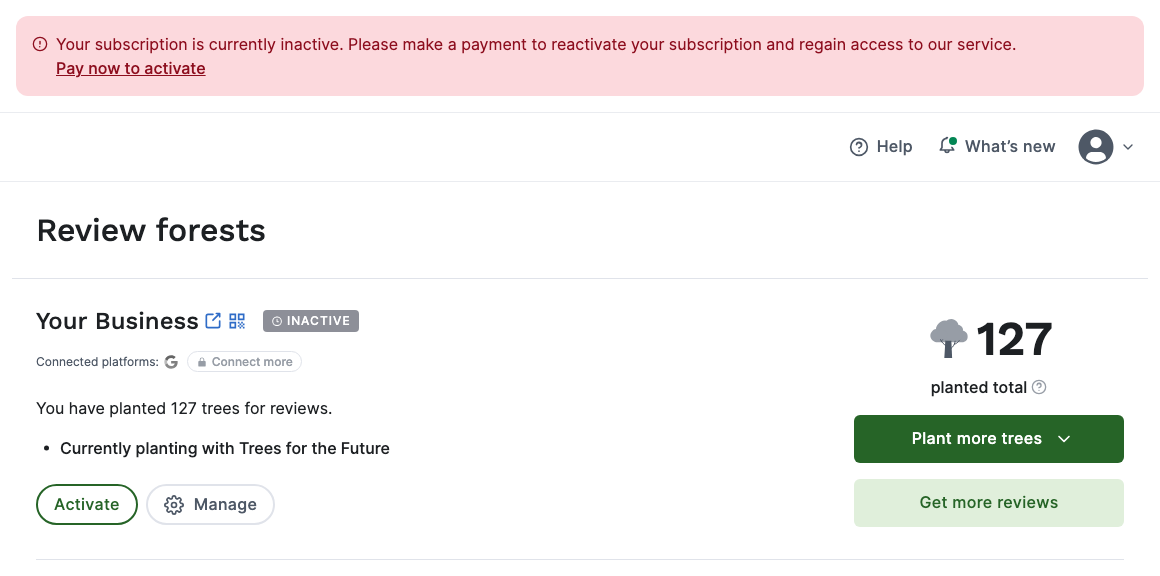
Section titled “Outstanding invoices”If a payment fails, for example because your card has expired or a direct debit was returned, we pause your subscription and all your review forests until the open amount is paid. You’ll get a payment reminder by email with the invoice attached, and your dashboard shows a red bar at the top: Your subscription is currently inactive. Please make a payment to reactivate your subscription and regain access to our service.
-
Click Pay now to activate in the red bar. The invoice opens in a new tab, on the payment page of our payment provider Stripe.
-
Pay by card or by SEPA Direct Debit. The payment method you use there is saved for your future invoices as well.
-
Go back to ReviewForest and reload the page.
Your forests switch back on by themselves once the payment has gone through. With a card, that’s usually within a day. With a direct debit, it can take a few business days until your bank confirms the payment. Reviews that came in while your forest was paused can then still get their trees, billed as usual.
Please pay through the link rather than by bank transfer. We don’t offer bank transfer, and the link makes sure your payment is matched to the right invoice.
Your subscription was cancelled
Section titled “Your subscription was cancelled”When a cancellation takes effect, all your review forests become inactive: on the end date if you cancelled at the end of the billing period, right away if you cancelled immediately. Deactivating your last active forest also cancels your subscription immediately. We confirm every cancellation by email.
You can reactivate your subscription under Billing & plan, see Reactivate after your subscription has ended.
If the end date hasn’t come yet, your forests are still active, and you can revoke the cancellation.
A single forest was deactivated
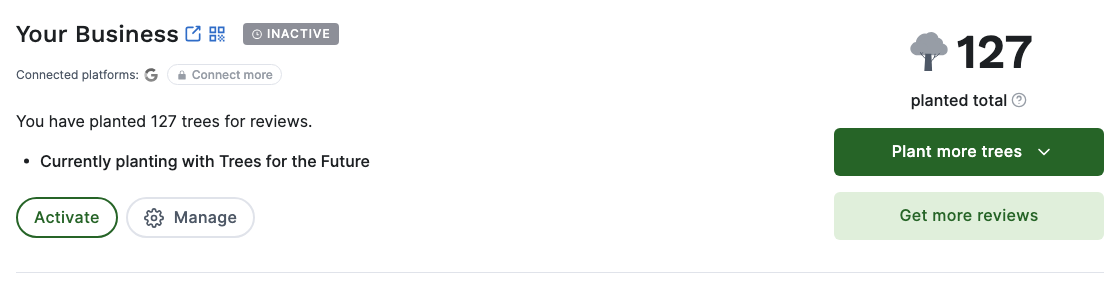
Section titled “A single forest was deactivated”You or someone on your team can switch off a single forest under Review forests > Manage > Deactivate review forest. Your subscription and your other forests keep running. We confirm this by email too.
-
Open Review forests.
-
Next to the inactive forest, click Activate.
-
Click Ok, reactivate.
The forest is active again and counts toward your plan price once more. If it had also reached its planting limit, you set a new limit in the same window and click Reactivate forest.
If Billing & plan shows Discontinued plan, you’re on a plan we no longer offer. Clicking Activate then asks you to switch to one of the current plans first.
Are all your forests inactive, although your subscription is running and no invoice is open? Then check under Billing & plan > Payment method that a valid payment method is saved. A returned direct debit, for example, can remove it. Click Edit to add a new one.
Brand forests need Professional
Section titled “Brand forests need Professional”A brand forest brings the reviews of several locations together, and it’s part of the Professional plan. On Standard or Premium your brand forest stays inactive, even though your other forests run normally.
To bring it back, switch to Professional under Billing & plan > Change plan.
The planting limit is reached
Section titled “The planting limit is reached”In this case your forest stays active and reviews keep coming in, but we stop planting trees for new reviews because the forest has reached the planting limit you set. Under Review forests the forest shows limit reached, and your forest page shows a note that the planting limit has been reached. We email you when 80% of the limit is used and again when it’s reached.
To keep planting, click Raise limit next to the forest, choose a higher limit or Unlimited, and click Save changes. All the details are in Set your planting limit and change your planting project.
Still not sure?
Section titled “Still not sure?”Write to us in the chat or at mail@reviewforest.org and tell us which forest it is. We’ll check it for you.